Peninsula Font for Web Design
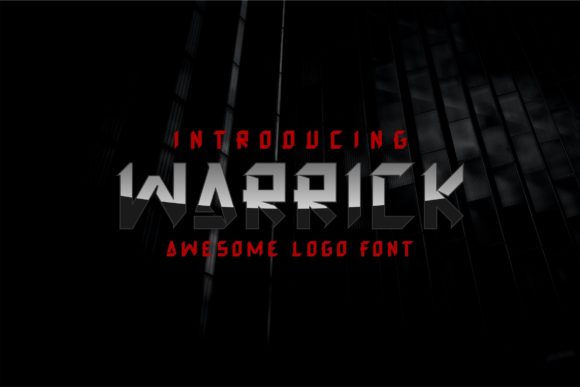
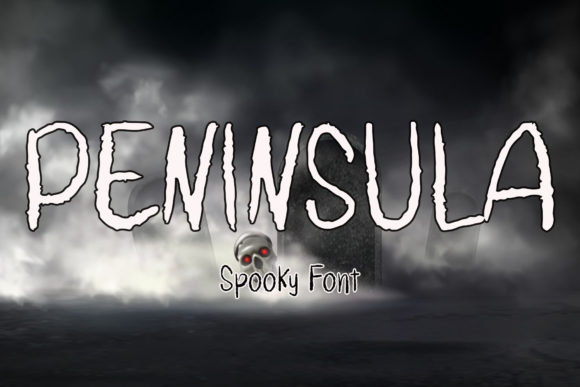
Peninsula is a display font with a dark and eerie aesthetic, making it ideal for Halloween-themed websites, creative projects, and digital branding. Its unique visual character adds a dramatic flair to any web design, especially when used in headers, banners, and call-to-action elements.
As a web designer, you know that typography plays a crucial role in shaping the user experience. Peninsula brings a strong personality to your layouts, helping to establish a distinct brand tone. Whether you're designing a boutique online store or a digital course landing page, this font can elevate the visual hierarchy and make key messages stand out.
Using Peninsula in Digital Layouts
Peninsula works best as a display font for short phrases, headlines, and decorative accents. It’s not designed for long paragraphs, but its bold and stylized look makes it perfect for hero sections, section headings, and CTA buttons. When paired with a clean sans serif or serif font, it creates a balanced and professional look without overwhelming the reader.
Consider using Peninsula in a creative portfolio site to add a mysterious touch to your project titles. For an online store selling seasonal products, it can be used in banners and promotional graphics to create a cohesive and thematic design. On a coaching website, it might appear in headlines to emphasize key messages and build trust through visual consistency.
Readability and Visual Hierarchy
While Peninsula is visually striking, it's important to use it thoughtfully. On mobile screens, ensure that the font size is large enough to maintain readability. In responsive layouts, test how it appears on different screen sizes and adjust spacing accordingly. When used on dark backgrounds, the font’s contrast can enhance legibility, but avoid placing it over busy images or text overlays that may reduce clarity.
In small buttons or icons, Peninsula can serve as a decorative element rather than a primary text. For example, a "Shop Now" button with a subtle Peninsula logo can add a unique touch without sacrificing usability. When designing for a brand that values creativity and originality, this font can help reinforce that identity through its distinctive style.
Font Pairing and Brand Identity
When working with Peninsula, consider pairing it with a simple, readable font for body copy. A modern sans serif like Open Sans or a classic serif like Georgia can provide a clean contrast that complements the font’s dramatic nature. This combination helps maintain a professional look while allowing Peninsula to shine in key areas of your design.
If your brand leans toward editorial or vintage aesthetics, pairing Peninsula with a script or handwritten font can create a more cohesive and nostalgic feel. However, keep in mind that too many decorative fonts can confuse the user and dilute the message. Stick to one or two complementary styles to maintain a clear visual language.
Practical Applications for Web Designers
For a digital product creator, Peninsula can be a powerful tool in logo design, social media graphics, and content headers. It’s also useful for creating eye-catching banners for blog posts, course pages, or online store promotions. When designing a landing page for a new product, using Peninsula in the headline can immediately draw attention and set the tone for the rest of the content.
On a SaaS website, Peninsula might appear in a section header to highlight a unique feature or benefit. In a branded web kit, it can be used consistently across multiple touchpoints, ensuring a unified and memorable brand presence. For a marketing campaign, it can be incorporated into email templates, social media posts, and ad creatives to maintain a consistent visual identity.
Commercial Licensing and File Formats
Before using Peninsula in a commercial project, check the licensing terms. Most premium fonts allow for web use, but it’s essential to verify that the license covers your specific application—whether it’s a client’s website, an online store, or a digital template. Ensure that the font includes webfont formats such as WOFF or WOFF2 for optimal performance and compatibility.
If the font offers multiple weights or alternate characters, take advantage of those features to add variety and depth to your designs. Multilingual support is also important if your audience speaks different languages. Always test the font in various contexts to ensure it maintains its quality and impact across different platforms and devices.
Peninsula is more than just a decorative font—it’s a versatile tool that can enhance your digital projects with its unique visual appeal. By understanding its strengths and limitations, you can use it effectively to create engaging, brand-focused web experiences that resonate with your audience.